Table of Contents
Looking for Where Did I Park codes? You are in the right place. Where Did I Park is a funny Roblox game where you lose your car in a giant parking lot with 100,000 cars, and you have to find it again. Codes give you free Gems, which help you unlock upgrades so you can search faster and find your car sooner.
In this post, you will find every working Where Did I Park code we could confirm, how to redeem them, and why a code might not work. We also put together a full Where Did I Park guide with beginner steps, tips, and common mistakes, so you can stop wandering around the lot and start winning.
All Where Did I Park Codes (October 2026)
We checked several trusted Roblox code sites and cross-checked the list. These are the codes reported as working in late September 2026.
Active Where Did I Park Codes
- MAP – 400 Gems
- UPDATE2 – 200 Gems
- release – 100 Gems
That is 700 free Gems in total if you redeem all three. Redeem them soon, because Roblox codes can stop working without warning.
Expired Where Did I Park Codes
- There are no expired Where Did I Park codes right now.
Last checked: September 29, 2026.
How to Redeem Where Did I Park Codes
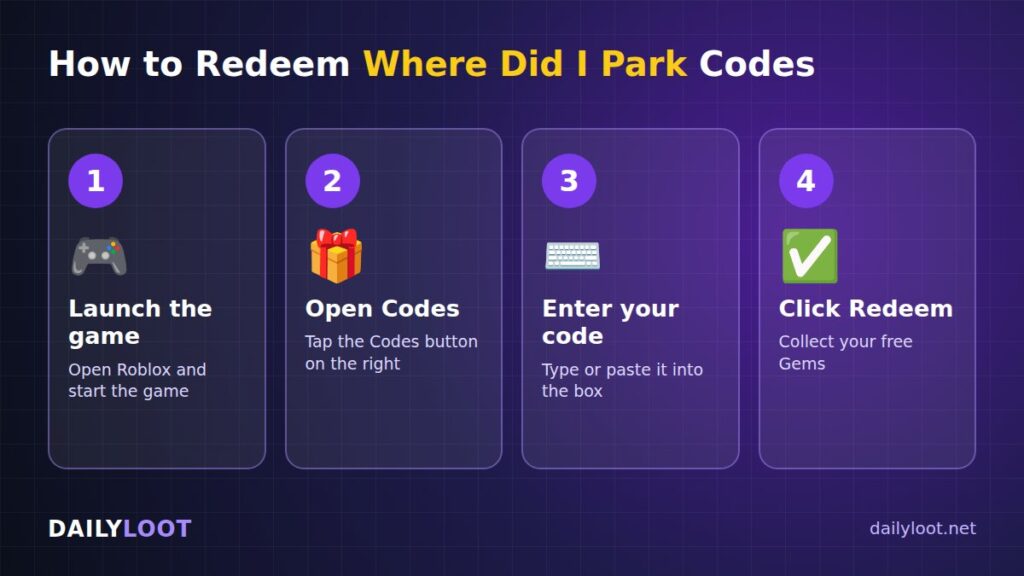
Redeeming codes in Where Did I Park only takes a few seconds. Just follow these steps:
- Launch the game – Open Roblox and start Where Did I Park.
- Open the Codes menu – Tap the Codes button on the right side.
- Enter your code – Type or paste a code into the box.
- Click Redeem – Press Redeem to collect your free Gems.
Tip: Copy and paste the codes from this page to avoid typing mistakes.
Why Is My Where Did I Park Code Not Working?
If a code does not work, do not worry. Here are the most common reasons:
- Typo in the code. Even one wrong letter breaks it. Check every letter carefully.
- Wrong capital letters. Some Roblox codes care about uppercase and lowercase. Type them exactly as shown, like release in lowercase and MAP in uppercase.
- Extra spaces. When you copy and paste, a space can sneak in before or after the code. Delete it.
- Already redeemed. Each code usually works only once per account.
- The code expired. Developers remove old codes over time. If a code stops working, it may have expired.
- Wrong game. There is a different Roblox game called Where Did I Park My Car. Codes for one game will not work in the other, so make sure you are playing Where Did I Park? by Caboose Studios.
- Old server. Sometimes new codes only work in updated servers. Leave the game and join a new server, then try again.
Watch Out for Fake Codes and Scams
Real Where Did I Park codes are always free and are redeemed inside the game. Never trust a website, video, or player that asks for your Roblox password, wants you to download something, or promises “unlimited Gems.” Those are scams that can get your account stolen. Stick to codes from the game’s official channels and trusted code pages like this one.
What Is Where Did I Park?
Where Did I Park is a Roblox search and simulator game made by Caboose Studios. The idea is simple and very relatable: you forgot where you parked your car, and now you have to find it in a gigantic parking lot filled with 100,000 cars.
You can play alone or team up with friends in groups of 1 to 4 players. As you search, you collect cash and valuables, buy upgrades, and even unlock drones that help you search. The winner is the team that finds the one unlocked car that belongs to them.
At the time of writing, the game has around 764 players online and a 79% rating on Roblox, so it has a small but active community. The game is live and playable right now.
How Where Did I Park Works
Where Did I Park looks easy at first, but with 100,000 cars in the lot, you need a smart plan. Here is how the main systems work.
Searching the Parking Lot
Your main goal is to check cars until you find the one that is unlocked. That car is yours. Every car you check that is not yours gets ruled out. Because the lot is so huge, walking up to cars one by one would take forever, so the game gives you ways to search faster.
Team Search and Elimination
When you play with a team, any car checked by one player is eliminated for the whole team. This means your friends are not wasting time on cars you already checked. A team of four can cover a lot more ground than one player, especially if everyone searches a different area.
Cash and Valuables
While you search, you can pick up cash and valuables scattered around the lot. Cash is used to upgrade your search stats during your run. Grabbing money as you move is important because better upgrades mean a faster search.
Upgrades
According to the game description, you can upgrade:
- Search speed – how fast you check cars.
- Search radius – how far your search reaches, so you can check more cars at once. Some community guides describe this as your key fob detection range.
- Walk speed – how quickly you move around the lot.
Drones
You can unlock drones that help you search. Drones make a big difference in such a large area because they help cover ground you are not standing on. According to community guides, you can also buy more advanced drones over time.
Gems
Gems are the premium currency in Where Did I Park. According to code guides, Gems can be used for permanent upgrades such as movement speed, search range, and better drones, and some guides also mention car skin unlocks. This is why codes are so useful: free Gems mean stronger permanent boosts from the start.
Where Did I Park Beginner Guide
If you are brand new to the game, follow this simple plan for your first few runs.
Step 1: Redeem All Codes First
Before you do anything else, redeem MAP, UPDATE2, and release. That gives you 700 Gems to spend on permanent upgrades. Starting with extra Gems makes your first searches much easier.
Step 2: Spend Gems on Speed and Range
Movement speed and search range are two of the most helpful upgrades for beginners. Faster walking lets you cover more of the lot, and a bigger search range lets you check more cars at the same time.
Step 3: Pick Up Cash as You Go
Do not just run past cash and valuables. Grab them while you search. That money turns into upgrades, and upgrades turn into faster wins.
Step 4: Search in a Pattern
Instead of running around randomly, move in rows or lines across the lot. This way, you do not go back to areas you have already checked. It is like mowing a lawn, one row at a time.
Step 5: Play With Friends
Try joining a team of up to 4 players. Since checked cars are removed for the whole team, working together can save a lot of time. Split up and search different parts of the lot.
Step 6: Unlock Drones
Once you can afford it, unlock a drone. Drones help you search areas you are not in, which is a huge help in a lot this big.
Best Where Did I Park Tips and Tricks
Here are our best tips to help you find your car faster:
- Redeem codes before your first run. Free Gems are the easiest boost you can get.
- Focus on search radius early. A bigger search area means more cars checked with every step.
- Do not ignore walk speed. The lot is huge, and moving faster saves a lot of time.
- Collect cash while moving. Try to plan your path so you pass cash and valuables on the way.
- Search the edges and rows in order. A clear pattern stops you from checking the same area twice.
- Talk with your team. If you play with friends, agree on who searches which section.
- Get a drone as soon as you can. Extra searching power is always welcome.
- Keep an eye on updates. Codes like UPDATE2 and MAP seem to come with new updates, so new codes may drop with future patches.
- Join the official Discord. Community guides say the developers share news and codes in their Discord server.
Common Mistakes to Avoid
New players often make the same few mistakes. Avoid these and you will do much better:
- Running around randomly. Without a plan, you will check the same cars again and waste time.
- Skipping cash. If you ignore money, your upgrades will fall behind.
- Spending Gems on fun stuff first. Cosmetics are cool, but speed and range upgrades help you win.
- Playing in the wrong game. Where Did I Park My Car is a different game. Make sure you are in Where Did I Park? by Caboose Studios if you want these codes to work.
- Forgetting to redeem codes. Codes can expire. Use them as soon as you see them.
- Everyone searching the same spot. On a team, spread out so you cover more ground.
Is Where Did I Park Free to Play?
Yes, Where Did I Park is free to play on Roblox. You can join, search the parking lot, and earn cash and upgrades without spending any Robux. Like many Roblox games, there may be optional paid items, but you do not need them to have fun or find your car. Redeeming codes is also free and is one of the best ways to get Gems without paying.
Games Like Where Did I Park
If you enjoy upgrading your stats and getting a little stronger every run, you might also like Lift a Cube. It is a Roblox incremental simulator where you keep growing your power over time. It is a great pick if you love that “just one more upgrade” feeling. Make sure to check our Lift a Cube codes page for free rewards before you start playing.
Also, if you love the idea of finding your car in a giant lot, you might want to try Where Did I Park My Car on Roblox. It has a very similar idea, but remember that it is a separate game, so codes do not carry over between them.
Where Did I Park Codes FAQ
What are the newest Where Did I Park codes? The working codes right now are MAP (400 Gems), UPDATE2 (200 Gems), and release (100 Gems). We will update this page when new codes come out.
How many Gems can I get from codes? If you redeem all three active codes, you get 700 Gems in total.
Where is the Codes button in Where Did I Park? The Codes button is on the right side of your screen after you load into the game.
Who made Where Did I Park on Roblox? Where Did I Park was made by Caboose Studios.
Can I play Where Did I Park with friends? Yes. You can play solo or in teams of 1 to 4 players, and cars checked by one player are ruled out for the whole team.
Are Where Did I Park and Where Did I Park My Car the same game? No. They are two different Roblox games with a similar idea. Codes for Where Did I Park will not work in Where Did I Park My Car.
How do I get more Where Did I Park codes? Bookmark this page and check back often. You can also follow the developer’s official Discord, where new codes are usually shared after updates.
Final Words
Where Did I Park turns a very real problem, forgetting where you parked, into a fun Roblox challenge. With 100,000 cars in the lot, every bit of help counts, so make sure you redeem MAP, UPDATE2, and release for 700 free Gems before your next search. Spend them on speed and range, grab cash as you go, and team up with friends to find your car faster.
We will keep checking for new Where Did I Park codes and update this page when they drop. Bookmark DailyLoot and come back soon for more free Roblox rewards and guides. Happy searching!